Facebook Badge

Keep updated ,Follow us here
Showing posts with label Unlock. Show all posts

Sunday, March 27, 2011

iPhone 4 NCK unlock progress [Update]

It looks like the iPhone Dev-Team successfully dumped the seczone to do the brute force NCK cracking offline. It also looks like they were able to capture the official NCK key from their carrier which they needed to “decode” the encryption algorithms that are used to generate the NCK key. That way, in combination with the NORID and CHIPID (and likely some additional information from the baseband), they will be able to generate the the NCK for every unique device out there.

deviceKey = SHA1_hash(norID+chipID)
nckKey = custom_hash(norID, chipID, SHA1_hash(NCK), deviceKey)
(the nckKey is the key that eventually gives the seczone (and so the baseband) the unlocked state).
Right now they are brute force cracking the encryption, which is going to take a few days (if not weeks). If they succeed, progress may be made fast. In the meanwhile they are working on a software unlock. Please note that both are not said to success.

3. Now what? Should I sell my locked iPhone 4?
I’d wait for more information on this “NCK-unlock”. Right now it’s pretty vague what timeframe we’re talking about. If the Dev-Team can pull this method off, it’d be very promising for those waiting for an unlock. If this method turns out to be not doable, I’d consider selling your iPhone 4 and save up for a factory unlocked iPhone 5.

4. Do you think there is ever going to be an unlock?
Of course. But that’s unlikely to be any time soon (with soon being <1 month).


5. If the NCK method fails, how long do you think it will take for the Dev-Team to unlock the iPhone 4 softwarematically? 
No ETA at all. Could be a few weeks, but it could easily be a few months as well. Hope this helps.

RElated:


Unlock iPhone 4 Basebands 2.10.04 / 3.10.01 New Progress on NCK Unlock

Thursday, March 10, 2011

iPhone 4 Unlock Delayed, Apple Beats Devs

Unfortunately, MuscleNerd the well-known iPhone hacker has announced some bad news about iPhone 4 unlock status, he mentioned that it will take longer than they want to finished unlocking task for iPhone 4 basebands above 01.59.00.

Ultrasn0w unlockers should know the drill! Don't let iTunes trick you into installing today's 4.3 iOS. Just say no!
Sorry, there's no news on the i4 unlock for those who lost 01.59 (or never had it). It's taking longer than we wanted :(
So if you rely on ultrasn0w to unlock your device, don't upgrade to iOS 4.3, and don't let iTunes trick you into installing it, just say no!

Diffidently, this news should disappoint who are waiting eagerly for unlock their devices on 2.10.04 , 3.10.01 basebands, but for who have unlocked devices, we hope that dev-team will be able to upgrade PwnageTool to be able to upgrade to iOS 4.3 with preserving the unlockable baseband. let's wait and see.

Monday, January 17, 2011

iPhone Jailbreaking/unlocking will stop?


NBC reports that Apple is trying to recruit the Federal Government to help crackdown on the hackers performing the jailbreaking of the iOS. They’re attempting to gain help again even after a losing legal battle against the EFF last year involving iPhone jailbreaking and unlocking. “Current jailbreak technologies now in widespread use utilize unauthorized modifications to the copyrighted bootloader and operating system, resulting in the infringement of the copyrights in those programs,” Apple told the U.S. Copyright Office. Jailbreaking an iPhone breaks the law, Apple said, because the process relies on pirated copies of the bootloader and operating system. But if the rumors of the iPhone 5 being launched without a physical home button were to come true, it would definitely make jailbreaking the iDevice much more complicated. It’s highly unlikely that there will ever be a sure-fire way to stop jailbreaking/unlocking but even so, do you think that Apple will ever implement something that would truly make people think twice about jailbreaking/unlocking their iDevice?
Source: NBC

Saturday, January 8, 2011

iPhone 4 Unlock to Follow After Verizon iPhone Launch?

It’s been quite the last few days and people are still asking about iPhone 4 unlock on higher basebands. Look what we have found while perusing MuscleNerd’s Twitter account, the iPhone Dev Team may be waiting for Verizon iPhone’s launch next Tuesday to push their unlock to iOS users.


hishamm126: @MuscleNerd Can we conclude that the i4 unlock is ready but it’s just waiting for the untethered JB?

MuscleNerd: @hishamm126 the Verizon rumor mill is much more relevant :)
This tweet was sent by MuscleNerd in a reply to someone asking him if he’s waiting for the untethered jailbreak to be released. iPhone hacker MuscleNerd answered him saying that the time of release is more relevant to the Verizon iPhone rumors leaked yesterday.

Don't raise your hopes up, but share us what do you think of MuscleNerd's tweet? Feel free to leave comments below.

Saturday, December 18, 2010

HOW TO: Unlock your new Nexus S Bootloader !

Google's Nexus S has got some news today. As most of you know, Nexus S is now available at BestBuy, so in case you are one of the early adopters of this phone, you may ask yourself, “how to root the Nexus S?”


For those who don't know, unlocking Nexus S bootloader will allow you to go into custom recovery mode so you can install custom ROMs like Cyanogen Mod etc. The steps are pretty easy but you need to have the basic Android fastboot knowledge. Just follow the step by step guide below to unlock your new Nexus S bootloader.

STEP 1: Shutdown your Nexus S.

STEP 2: Hold down the Volume Up key then hold the Power key.

STEP 3: Now your device'll get in Standard Recovery Mode.

STEP 4: Now ppen command prompt or Terminal (depending on what OS you’re using, this is on your computer) then type “fastboot devices”. This will tell you if your phone is connected via USB or not.

STEP 5: Type “fastboot oem unlock” if you're connected.

STEP 6: Almost done, now use Volume keys to select ‘yes, unlock bootloader’ then use power button to select option and your new bootloader will be unlocked now !

Thursday, December 9, 2010

Restore iPhone 3GS, 3G to iOS 4.2.1 / 4.1 on 06.15.00 Baseband After Using Ultrasn0w 1.2 [How to Guide]

In case you have unlocked your iPhone 3GS / 3G by flashing iPad baseband 6.15.00 with ultrasn0w 1.2 on iOS 4.2.1, and have issues while restoring your device, here is Sherif Hashim the guy behind ultrasn0w unlock tool, has posted a simple guide showing how to restore your iPhone 3GS / 3G to avoid iTunes errors.
Note: To restore your iPhone 3GS from 4.2.1 to 4.1, you must have saved SHSH blobs for iOS 4.1.

For PwnageTool users:
A :  If you are on Mac and use PwnageTool: If you used pwnage tool then you will have to create a “new” custom 4.1 or 4.2.1 and say “No” when you are offered the BB update to 6.15.00 since you already have it, then build the custom ipsw and restore to that.
For Redsn0w users:
B : If you use(d) Redsn0w:

B.1: If you are currently on 4.1, then you can restore to official 4.1 again, and when you see error 1015 pop-up, you kick your device out of recovery mode using TinyUmbrella, use redsn0w and don’t check “ipad BB update” because you already have that Here Is How To Restore iPhone 3G And iPhone 3GS While On Baseband 06.15.00 And Having Issues icon smile

B.2: If you are currently on 4.2.1 then you’ll have to restore back to 4.1 (because 4.2.1 will not allow you to kick the phone out of recovery when 1015 occurs due to the silly BB / iOS mismatch check added there) , then do the same steps as CASE-1.
How to go again to iOS 4.2.1:
If you want to go again to 4.2.1 your only way is to use a custom 4.2.1 done by pwnage tool in the same steps mentioned in A .
Try Hashim's methods above to restore you device between 4.2.1 and 4.1, it worth trying. Don't forget to tell us about your experience.

Wednesday, December 8, 2010

Downgrade 06.15.00 Baseband iPhone 3GS / 3G on iOS 4.2.1 After Ultrasn0w 1.2 Soon

Here's a bit of good news for who suffered from the new unlockable baseband 6.15.00 on iPhone 3GS and 3G. Most of the unlockers who unlocked their devices with ultrasn0w 1.2 can't restore to any stock firmware above 4.1, it only can be restored to a custom firmware, moreover, ultrasn0w 1.2 caused a loss of GPS. Let's check out the new progress regarding downgrade 06.15.00 baseband.
Lezanz: what about GPS issue? Any progress?

Musclenerd: sorry still collecting data on that. But also working on a bb downgrade (!) method for those with unlockable bb
MuscleNerd has confirmed in a tweet that he is working on a new method to downgrade baseband 6.15.00 to lower versions, which will be unlockable and to fix the GPS issue. Till now we didn't catch more details, but of course will let you know once we catch more, stay tuned.

Friday, December 3, 2010

HOW TO: Activate iPhone 4, 3GS, 3G Without Original SIM or Hacktivation with SAM & Redsn0w 0.9.6b6

Few minutes ago, a new mix-up between iPhone dev-team and sbingner, has been done to allow you to activate your iPhone 4, 3GS and 3G without using original SIM or Hactivation. Thanks to sbingner's new tool which called SAM (Subscriber Artificial Module) and redsn0w 0.9.6b6. Moreover this mix-up has fixed the battery consuming after unlocking iPhone 3GS/3G with ultrasn0w 1.2. Let's check out how use this package after the jump.
STEP 1: Download Redsn0w 0.9.6b6 for Windows and Mac, (Links at the end)

STEP 2: For iPhone 3GS/3G users follow our previous guide posted here, for other devices follow this guide, (But be sure you are using Redsn0w 0.9.6b6)

STEP 3: After you finish jailbreaking your device, start Cydia and add http://repo.bingner.com repository.
STEP 4: Then install “SAM” and “SAMPrefs”.

STEP 5: Launch Redsn0w 0.9.6b6 again, and select “Deactivate” option.
STEP 6: Navigate to Settings > SAM and click "De-Activate iPhone"

STEP 7: Connect your iPhone to your PC then launch iTunes, allow iTunes to activate your iPhone officially. You will see this message "iPhone is activated"

According to sbingner : If iTunes says invalid SIM, you will need to manually select the appropriate carrier under one of the methods besides "Automatic" and click on a SIMID.

STEP 8: Here's the final step, go now and follow our guide posted here to unlock your device with ultrasn0w 1.2

Download Redsn0w 0.9.6b6 for Windows and Mac.

Wednesday, December 1, 2010

HOW TO: Fix iPhone 3GS / 3G Battery Drain Problem & Over Heat After Unlocking With Ultrasn0w 1.2

The newly released ultrasn0w 1.2 which unlocked the iPhone 3GS/3G running iOS 4.2.1 by flashing the iPad baseband 06.15.00 using Redsn0w 0.9.6b5 or PwnageTool 4.1.3, has caused two major issues for many iPhone 3GS/3G users, ultrasn0w 1.2 has led to aggressive battery drainage, in addition, iPhone becoming excessively hot. Sherif Hashim, one of the hackers behind ultrasn0w has addressed these issues, let's check out them after the jump.
Here's Hashim justifying these issues
i hope those of u with 3g/3gs are enjoying their updated unlocked devices, all props to @MuscleNerd & co. for making this possible :) , hopefully the iphone 4 on 2.10.04 and 3.10.01 follows within a good time table.

on a very important side note, before anyone starts to complain about battery drainage issues after installing the new ultrasn0w on the 6.15.00 updated BB, the culprit here is not ultrasn0w, it's the hacktivation process (activating the phone by pwnage tool or redsn0w rather than using an official carrier sim to do so) that u mostly did while jailbreaking.

The 4.1 and 4.2.1 ipsws unlike their old ancestors, seem to keep looking for valid push certificates all the time, either thru your wifi, or thru your cellular data network (which u only have after installing ultrasn0w and hence u accuse it) , this can be seen clearly if u have a cellular working data plan for 3g or edge and u watched the settings > general > usage > cellular network data (sent & received are continuously increasing even without using any internet traffics on the phone) , this will also render the phone going hot even in stand by mode and also very rapid battery drainage occurs plus consuming ur data if you were not on an unlimited plan.
How can you fix these problems:
so to resolve this, u either:
A) 1st Solution: try to activate the phone using the official sim if u have it (even if the sim itself is old and not working) , or borrow it from a friend if it's possible, by any means, try to have an access to one and use it
B) 2nd Solution: if A is not feasible, u can install SBsettings from featured cydia packages and turn wifi and data off when u r not using it (shuts down both 3g and edge) , till C is done
C) 3rd Solution: there is a very nice module being worked on by a trusted jailbreak app dev, namely @sbingner , which ll resolve that issue for those having it, the details of which shouldn't be disclosed until he finishes his awesome work, till then, either use A or B to resolve the issue if it exists for you
In case you're one of those who suffering from the above mentioned problems after unlocking their devices with ultrasn0w 1.2, you have to try the above solutions as they will handle the situation, but don't forget to feed us back with your results on the comments section.

Sunday, November 28, 2010

HOW TO: Update / Unlock iPhone 3GS / 3G Baseband 06.15.00 with Redsn0w 0.9.6b5 on iOS 4.2.1 / 4.1 [Windows & Mac]

Well, here's the iPhone Dev-Team has just released redsn0w 0.9.6b5 to jailbreak iPhone 3GS and 3G on iOS 4.2.1 and update baseband to 06.15.00 which can be unlocked with the newly released ultrasn0w 1.2, the redsn0w 0.9.6b5 is available for both windows and mac users.
The new redsn0w 0.9.6beta5 is out. It gives both Windows and OSX users the ability to flash the iPad 06.15 baseband on iPhone3G or iPhone3GS. It fetches the baseband files directly from Apple for now (the only IPSW you ever point it at is the stock IPSW for the FW on your iPhone right now). There may be a long delay while it’s doing this (their servers are currently getting pounded).

WARNING — YOU DO THIS AT YOUR OWN RISK!  PLEASE UNDERSTAND THE CONSEQUENCES OF UPDATING TO 06.15.
  1. There is no way to come back down from 06.15, and there’s no hiding the baseband version from Apple. You’ll be voiding your warranty in a very obvious way.
  2. If some future baseband comes out with a critical fix, you won’t be able to update to it if it remains down in the 05.xx sequence (then again, you wouldn’t update to it if you wanted to keep your unlock anyway).
  3. Starting with FW 4.2.1 if you have 06.15 on your iPhone you won’t ever be able to restore to stock firmware (it will fail).  You’ll need to only restore to custom IPSWs (then again, if you’re unlocker you should already be doing that).
For whom is this Guide:
This version of redsn0w 0.9.6b5 is developed ONLY for iPhone 3GS and 3G users who rely on unlock. Precisely,  This guide showing how to jailbreak and update baseband to 06.15.00 for ONLY iPhone 3GS and 3G who have unlocked devices.

Unsupported devices, what have to do:
iPhone 4 and 3GS users who don't rely on unlock, you can follow the same guide but with redsn0w 0.9.6b4 to jailbreak their devices on iOS 4.2.1, see guide Posted Here.

Here's the step by step guide:

STEP 1: Download redsn0w 0.9.6b5,  iOS 4.2.1 for your device(download links at the end).

STEP 2: Update to 4.2.1 firmware using the IPSW file you just downloaded via iTunes 10.1.

STEP 3: Launch Redsn0w 0.9.6b5,  and browse for iOS 4.2.1 firmware final version.
STEP 4: Now you have to select "Install Cydia" and "Install iPad baseband", and then click "Next" (in this step redsn0w will update your baseband to 06.15.00 which works with ultrasn0w 1.2)
STEP 5: Now make sure your device is both OFF and PLUGGED IN to the computer before you click “Next”.
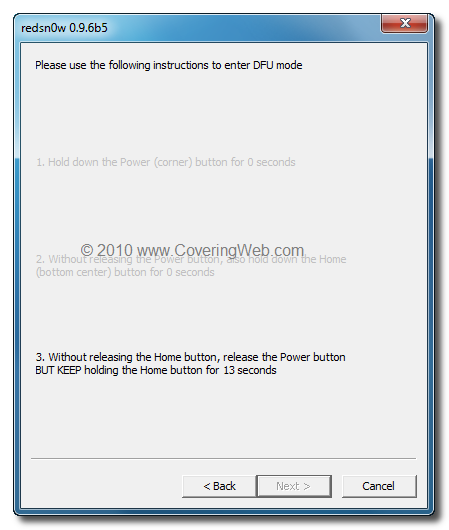
STEP 6: At this stage you will need to put your iPhone in DFU mode by holding “Power” button and then while holding the “Power” button, you will now have to hold “Home” button too. Now after few seconds release “Power” button but keep holding “Home” button until installation begins.
 
STEP 7: You will Get a Jailbroken Device on the latest iOS 4.2.1  and the unlockable baseband 06.15.00

STEP 8: This step is only for these devices iPhone 4, 3GS (New Bootrom), iPod touch 4G,  3G, 2G, iPad. While this is tethered jailbreak and whenever you want to do anything related to jailbreak like SSH your device, or running Cydia, you must first run your device in the so called “jailbroken state” on every reboot by using “Just boot tethered right now” option.

How to unlock iPhone 3GS / 3G on iOS 4.2.1 / 4.1 using ultrasn0w 1.2 :
This is the final step to get your device unlocked on iOS 4.2.1 / 4.1 with the newly release ultrasn0w 1.2, follow our full step by step guide Posted Here.

Download iOS 4.2.1 for iPhone, iPod touch and iPad
Download Redsn0w 0.9.6b5 for Windows
Download Redsn0w 0.9.6b5 for Mac
Download iTunes 10.1 for Windows or Mac

HOW TO: Update iPhone 3GS / 3G Baseband to 06.15.00 and Unlock it

Just a couple of hours back, the iPhone Dev Team has updated their carrier unlock tool which brings unlock for iPhone 3GS & 3G on iOS 4.1 or iOS 4.2.1 but unfortunately, you have to update your device's baseband to 06.15.00 to be able to unlock it.


Simply follow the steps below to jailbreak and unlock your iPhone 3G on iOS 4.2.1 using PwnageTool 4.1.3 for Mac OS X.

STEP 1: Download PwnageTool 4.1.3 unlock edition from here.

STEP 2: Download iOS 4.2.1 for your device and also catch iOS 3.2.2 from here before it's removed (required to update the baseband). Then copy all the files to your desktop.

STEP 3: Now launch PwnageTool and select iPhone 3GS / 3G and point it to the original iOS 4.2.1 firmware you downloaded.

STEP 4: You'll now be asked if you want to update your baseband to the 06.15 version. If you are on 05.14 or 05.15 or higher you will need to do this to unlock. You do not need to do this for jailbreak only. Click on YES and then select Browse for IPSW and point it to iOS 3.2.2 you downloaded.
STEP 5: You'll have to choose some options as installing Cydia packages, custom logos and packages. Finally, hit the blue the build button.
STEP 6: You'll be asked to save the cooked firmware. Please allow up to 10 minutes.
STEP 7: When prompted if your iPhone has been Pwned before, we clicked No. It allows for a more thorough restore. Once done, follow the instructions seen on the screen to enter into DFU mode
STEP 8: Now, You will have to restore your iPhone to the jailbroken custom firmware by Clicking on the iPhone icon on the left sidebar of iTunes then hold left “alt” button (“Shift” button on Windows) on the keyboard and then click on “Restore” then release the alt button, Now Select the custom firmware created by PwnageTool and Let iTunes go in a bunch of steps.

STEP 9: Almost done, you can now unlock your iPhone 3GS / 3G by following my previous guide posted here.

Saturday, November 27, 2010

Unlock iPhone 4 Baseband 02.10.04 Seems Imminent

In case you are living under rocks, you may don't know that Ultrasn0w carrier unlock will be updated tomorrow (this Sunday) to provide a full unlock for iPhone 3GS / 3G on baseband 05.15.04 and lower ones. Anyway, iPhone 4 unlockers will have to wait a bit longer but we have good news for you too.

iPhone hacker Sherif Hashim is doing a great progress in unlocking iPhone 4 baseband 02.10.04 on iOS 4.2.1 / iOS 4.1 since he, according to this tweet, has provided very nice crashes for iPhone 4 baseband, also the iPhone Dev Team will start exploring more starting from this Monday.
Faiz: @MuscleNerd btw @sherif_hashim was working on i4 since long ? Did he not find anything interesting.

MuscleNerd: @mfaizulislam just the opposite :) @sherif_hashim has provided very nice crashes for i4 BB, which we can explore more starting Monday :)
This news gives some hope to iPhone 4 users who stuck on iOS 4.2.1 or iOS 4.1 with upgraded baseband as BB 02.10.04 or BB 03.10.01. More updates as they come! Stay tuned !

Ultrasn0w to Unlock iPhone 3GS / 3G on iOS 4.2.1 Completed

Few moments ago, Musclenerd has confirmed that the ultrasn0w to unlock iPhone 3GS and iPhone 3G finally got working fully on 4.2.1, so it looks that everything over there going alright, everything on schedule, which means that we will catch new version of ultrasn0w tomorrow as we mentioned before.
Musclenerd: Finally got ultrasn0w working fully on 4.2.1. Apple inadvertently(!) broke ultrasn0w via aggressive compiler optimization
Till know there's no news about iPhone 4 baseband unlock. For now we let you know immediately after the release of the new ultrasn0w, stay tuned.

Monday, November 22, 2010

iOS 4.2.1 Jailbreak and Unlock: What you Need to Know

As most of you know, Apple today has released iOS 4.2.1 for iPhone, iPad and iPod touch bringing multitasking to iPad, AirPlay, AirPrint, unified mail and some new features to iOS devices. Since I have received lots of questions about iOS 4.2.1 jailbreak and unlock, let's show you what's going on and what's your situation of jailbreaking.
iOS 4.2.1 Jailbreak
There's no new tools released for iOS 4.2.1, but we tried the latest version of Redsn0w and it works on iOS 4.2.1 the same as it done iOS 4.2.1 GM, so you can follow our previous guide posted here to jailbreak iOS 4.2.1 using Redsn0w and then use our guide posted here to patch Cydia and run it on iOS 4.2.1.
iOS 4.2.1 Unlock
Yes, the new version of Ultrasn0w should be released today, tomorrow or this week. It should come out a day or 2 days at most after iOS 4.2 is released (as promised), so we can see it anytime now.

In case you updated to iOS 4.2.1, you will notice that it's baseband is different from iOS 4.1's one but they both will be unlocked by the same tool as the new baseband doesn't catch any holes. We'll have to wait and see what happens.

Save SHSH Blobs
If you’re on iOS 4.1 and jailbroken, by this point you should know how to save your SHSH blobs via TinyUmbrella to ensure untethered jailbreak as soon as iPhone hacker comex pull another trick out of his hat, the iOS 4.2.1 jailbreak is tethered on all iOS devices except iPhone 3G, iPhone 3GS (old bootrom) and non-MC iPod touch 2G.
Though all this, I highly recommend waiting to upgrade for the official tools, but if you feel the need to give it a try right now.

Friday, November 12, 2010

iTunes 10.1 Safe for Jailbreak [CONFIRMED]

We are answering all the wonders now. The popular iPhone hacker Sherif Hashim has just posted on his Twitter account that iTunes 10.1 is safe for already jailbroken devices with PwnageTool, Redsn0w, and almost all tools but don't ever update your carrier.
iTunes 10.1 appears to be safe for already jb devices, also plays well with latest versions of redsn0w, pwnage tool and tinyUmbrella :)
So, go ahead and update your iTunes version or download iTunes 10.1 from here and now let's wait for iOS 4.2 public release (may be on November 24th?), Stay tuned for this big news.

Wednesday, November 10, 2010

New Details of iOS 4.2 Jailbreak & Unlock

Just a quick little heads up! iPhone Dev Team has just posted new details about the new iOS 4.2 untethered jailbreak and also they talked about baseband 05.14.02 and 02.10.04 unlock. iOS 4.2 will be released on Friday to bring lots of new features, so the Dev Team promises with lots of things that will satisfy our readers!
By all accounts, we’re within a few days of Apple’s official public release of Firmware 4.2. Here’s what you need to know:
- Thanks to geohot’s limera1n exploit, and our original pwnage2 exploit, and pod2g’s ipod2g-MC exploit, absolutely all devices at all iOS devices at all
- The untethered jailbreak of the very latest FWs and devices depends on @comex hacks. His hacks so far extend only to 4.1 and 4.2beta3. He’s working on a way to extend it to 4.2 and beyond. Just wait for him to work out his method.
- iPhone 3G and 3GS unlockers will be covered by our upcoming unlock. Stay away from any updates to Apple FW until our official release and you’ll be okay. Just stay away from all Apple IPSWs :)
- iPhone4 unlockers are not left out in the cold. @sherif_hashim has found some very promising avenues to pursue. Those will be explored as soon as possible after all the 4.2 madness.

What does this mean to you?
- If you’re an unlocker, just stay where you are. Please, just stay where you are. Any mistakes you make now may be permanent.
- If you only care about the jailbreak, feel free to experiment but keep in mind that any mistake you make may result in you losing pictures or notes or bookmarks that you’d rather keep. Honestly unless you love living on the bleeding edge, it’s better to just wait for official updates from Cydia/redsn0w/PwnageTool.
- Don’t buy or donate to any unlock or jailbreak scammers. Every legitimate solution you will find for unlocks or jailbreaks will be offered without an extended hand. That’s how this community works. It’s about freedom, not donations.
Better explanation? iPhone hacker comex could make untethered jailbreak until iOS 4.2 beta 3 (that's why you see it's SHSH in Cydia) and is working on extending it to final iOS 4.2. iPhone 3G and iPhone 3GS will get Ultrasn0w unlock once iOS 4.2 is released while iPhone 4 will get it a bit more but as soon as possible ! So, stay tuned for some good news here !

Saturday, October 30, 2010

Unlock Baseband 05.14.02 is Just a Day After iOS 4.2 is Public

Here's some good news for all people over there waiting for baseband 05.14.02 unlock on iPhone 3G and iPhone 3GS. Few days ago, MuscleNerd the iPhone hacker of the iPhone Dev Team has replied a user asking him about iPhone 3GS unlock on iOS 4.1. the reply will satisfy you a lot.
Here's what MuscleNerd tweeted in reply to the guy:
MuscleNerd: if you’re on 3G or 3GS, just a day or 2 at most after 4.2 is public (just enough time to verify stuff)
This reply brings both bad and good news, why? because he didn't mention anything about iPhone 4 baseband 02.10.04, this may indicates that iPhone 4 unlock may be delayed and not released at this time.

iOS 4.2 should be released early in November (this is very near). To sum it all up, iPhone 3GS and iPhone 3G on baseband 05.14.02 will get the unlock early in November. Stay tuned as we will keep you informed whenever iOS 4.2 is available and followed by the unlock.

UPDATE 1: iOS 4.2 is about to be released as Apple has just confirmed the release date of iOS 4.2 to be launched today in a new press release, check it here. Anyway, the unlock (as promised) will be tomorrow at most as the above post confirms.

Friday, October 15, 2010

Limesn0w Unlock Tool Will Never be Real !

A few days ago we had hopes when we reported you about the Limesn0w unlock tool which was expected as a new surprise from Geohot to unlock basebands 05.14.02 and 02.10.04 on iPhone 3GS and iPhone 4G on iOS 4.1, but now Geohot cut in any doubt, when he announced that Limes0w unlock tool will never be real in his limesn0w.com website.
This will never be real. Media, understand it. ~geohot
So that, if you see any picture or video claiming the unlock of those basebands by limesn0w, they are completely fake.

We have no choice but waiting the new unlock from the Dev-team, for who don't know, the unlock for the above mentioned basebands will be released after iOS 4.2 official release by November.

You may also like:

Monday, October 11, 2010

LimeSn0w to Unlock iOS 4.1 On its Way By Geohot?

It may be real! Geohot may surprise us (again!) with a new unlock solution for iOS 4.1 on iPhone 4, iPhone 3GS and iPhone 3G using Limesn0w. The video below shows iPhone 3GS running iOS 4.1 on baseband 05.15.01 unlocked using Limesn0w solution via Limera1n jailbreak which was released two days ago. It would be a real surprise.
Of course there's a lot of users have updated to iOS 4.1 and now their devices on baseband 05.15.01 or 02.10.04 which is not unlockable at the moment. So Geohot may really surprise us Limesn0w.
The domain http://limesn0w.com is registered by Geohot, the same info as http://limera1n.com but the site indicates that "This will never be real.", you know, surprises! Geohot didn't say any word about that, we'll keep you updated at any update happens.

[Thanks John & everyone else for the tip]

You may also like:

Unlock Baseband 05.14.02 / 2.10.4 After iOS 4.2 [CONFIRMED]

After you have enjoyed your jailbreak with lime flavor by limera1n jailbreak on iPhone 4/3GS , iPod touch 4G/3G and iPad on iOS 4.0/4.1 and 3.2.2, most of you are asking eagerly about the unlock for basebands 5.14.02 and 2.10.4, today we have a significant progress on this matter, as Sherif Hashim has just sent a tweet announcing that he succeeded on 1st step on both sides.
since nearly all my received tweets ask about both BB, I can report very early "initial" 1st step success on both sides, calmed down? :)
A new exploitable baseband crash has been found. An unlock will very likely be released after iOS 4.2 and will unlock both BB's of 4.1 & 4.2
And now Veeence is mentioning the discovery of new exploitable baseband crash, and confirming again about ETA for the unlock which is very likely be released after iOS 4.2 official release by November, so that it will be able to unlock both basebands of iOS 4.1 and 4.2.

In the meantime, you can update to iOS 4.1 with preserving your baseband using TinyUmbrella, see guide posted here, and then you have to follow our guide to jailbreak your iPhone 4 and 3GS on iOS 4.1 using limera1n jailbreak in this post. Now you will be able to unlock your iPhone 4/3GS using ultrasn0w.


UPDATE 1: MuscleNerd has just confirmed that unlock for baseband 05.14.02 and 2.10.4 will be released after iOS 4.2 release in a simple tweet:
You may also like: