Yes, you read it write! Now you can downgrade the annoying new iOS 4.0.2 to iOS 4.0.1 or iOS 4, without having your SHSH blobs saved. YES! without SHSH blobs. The tip was sent to us by one of our readers who wishes to remain anonymous, we made some tests and we got our conclusion at the end of the post.
Step 1: Download the iOS 4.0.1 from
here, download iTunes from
here.
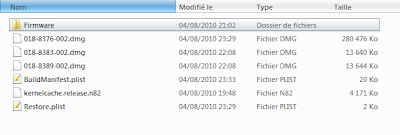
Step 2: Extract it with Winrar or Winzip to a folder on the desktop. You may need to rename the firmware file from .ipsw to .zip to be able to extract.
Step 3: Open
buildmanifest.plist file from the extracted files using Notepad (for Windows) or TextEdit (for Mac OS X) Search and replace all – 8A306 with 8A400. Do the same with
restore.plist file and save both of them.
Step 4: Now download
iOS 4.0.2 and extract it using Winrar or Winzip.
Step 5: Drag all files extracted files from iOS 4.0.1 and replace them with all files of iOS 4.0.2.
Step 6: Delete all ".dmg" files that end with 002 leaving files that end with 001. Then zip the new customized firmware and change it to ".ipsw" file, for example "downgrade.ipsw".
Step 7: This step is option, it helps you to ensure you get an SHSH file request for the future, but should not be necessary to just restore 4.0.1
- Locate "C:\Windows\System32\drivers\etc\" for Windows and "/etc/" directory for Mac, then locate “hosts” file and Open it in Notepad (for Windows) or TextEdit (for Mac OS X) then add this line at the bottom of the file and save it.
74.208.105.171 gs.apple.com
Step 8: Connect your iPhone to your PC / Mac and launch iTunes (downloaded above)
Step 9: Now, put your iPad in DFU mode by following this steps,
- Connect your iPad to your computer.
- Turn iPad off.
- Start iTunes.
- Hold Power and Home buttons together for 10 seconds or so.
- Release Power button but keep holding the Home button until your computer recognizes a new USB device.
- iTunes will now recognize your iPad.
Step 10: Almost done, you will have to restore your iPhone to the firmware you have customized and saved in the above steps by Clicking on iPhone icon that appears in the left of iTunes then hold left “alt” button or “Shift” button on Windows from the keyboard and click on “Restore” then release the alt button. You will be promoted by a window to select the firmware, select your firmware file "downgrade.ipsw" you have made in the previous steps.
Step 11: After series of processes, iTunes will restore your device to the required firmware.
Now, You will be finally able to jailbreak and unlock your device using our guide
posted here to jailbreak and unlock any iPhone.
[Thanks Anonymous for the tip]Update 1: While downgrading from iOS 4.0.2 to iOS 4.0.1 / 4.0, users may face error 1015 in iTunes, use Error 1015 Fixer (
download here) to bypass from this error.
Update 2: Here's the modified .ipsw file that you should restore to for iPhone 3GS users It is a 4.0.2 firmware bundle, with the 4.0.1 files inside (as instructed) After restoring you will be at 4.0.1. it can be downloaded from
here.
Update 3: If you got stuck in recovery mode, just use Recboot 1.1, our guide
posted here.
Update 4: Just got all the modified firmwares for iPhone 4, 3GS and 3G,
iPhone 4
http://www.mediafire.com/?7i4zjgv41h1qliPhone 3GS
http://www.mediafire.com/?fzi76aw20t5sciPhone 3G
http://www.mediafire.com/?uur4hp6cl12x8[Thanks Behzad for uploading the files] Update 5: Well, here's a quick explain why it don't work for all. Users who reported of this method being working for them had at some point in past saved their SHSH files on Cydia, we can't say this method is fake, but it's pretty not working for people who don't have SHSH files on Cydia. Notcom
explains on his blog..
There is much discussion on many blogs about a potential means of downgrading iOS 4.0.2 to 4.0.1 by simply changing a couple values in the buildmanifest.plist and copying all of the images from 4.0.1 into 4.0.2 and then deleting the files ending with 002. Following all of this, perform a DFU restore and somehow you will be on 4.0.1.
There is a perfectly logical explanation for all of this and I will lay out exactly what is happening and explain why it is working for the folks that are the lucky ones.
Let me get this out first.
- This is not a miracle, at least not in the sense you all hope for
- SHSHs are STILL required for any iPhone 4, iPhone 3GS, iPad, iPod Touch 3G, and iPod Touch 2G (MC Model)
- There is NO way around this… unfortunately this method included.
Let me start by explaining something very important. The buildmanifest is used by iTunes to build much of the TSS request that is used to obtain your SHSH for any given firmware revision. Unfortunately, the BuildNumber has no part to play in the request for SHSH. All that you ended up doing in following these directions is request 4.0.1 SHSH blobs.THAT IS ALL. Since every single one of you that got this to work changed your hosts file to point to Cydia, Cydia responded to the TSS request with an SHSH blob that was ALREADY "on-file". There was no magic. There was no miracle, apart from the lucky break that your device had been put on Cydia’s SHSH request list at some time in the distant past.
That’s it in a nutshell folks. There was no amazing technique for bypassing Apple’s TSS. There was no amazing exploit that exists in DFU mode allowing for 4.0.2 -> 4.0.1 downgrading. It’s simple; Cydia had your SHSH because at sometime in the past either:
- Someone saved your SHSH with that device using TinyUmbrella and the default options
- Someone restored that device with Cydia in the hosts pointing to gs.apple.com
- Someone jailbroke the device and pressed ‘Make my life easier’
Yes, wait, wait and wait!
You may also like:
 The report claims that Apple's media event on September 1st will cover a lot of changes to iTunes by saying "a large part" of the event detailing how the new iTunes improves the user experience. But Apple is not expected to introduce a cloud-based iTunes service according to the report.